


Magzter: Magazines, Newspapers
3.81.00K Reviews
App Specs
- Version
- 8.74.0
- Updated On
- License
- Free
- Downloads
- 1,000,000+
- Developer
- Magzter Inc.
- Categories
- News & Magazines
- Platform
- Android, iOS
Screenshots


 Analysis by AppCompare
I like the idea of a newsstand that can travel with me, but the practical question is how much of the experience depends on a good connection. With Magzter: Magazines, Newspapers, browsing a large catalogue is most comfortable when pages and issue details load promptly. I’d treat it as a way to discover and read publications, not as a guaranteed substitute for every newspaper app or a paper copy in places where reception is unreliable.
When a connection makes the difference
The app’s breadth is useful when I have time to explore, but a broad digital catalogue also means there can be more to load and assess than in an app devoted to one publication. A dependable connection makes it easier to move from looking through titles to choosing something to read. If I’m heading out, I’d browse and make reading choices beforehand rather than assume every part of the experience will be equally convenient on a weak network.
That distinction matters for commuters and travelers. A magazine can be a welcome way to fill a stretch of waiting, but a station platform or a crowded route may not offer consistent service. I’d plan around the connection I actually expect to have: choose an issue while online, and check that it is ready before leaving, rather than waiting until the moment I want to read. The app’s appeal is strongest when discovery happens at a convenient time, not when I’m rushing to get something loaded.
How it fits into a phone-sized day
Digital magazines are particularly handy in small pockets of free time: during a lunch break, while waiting for an appointment, or at home when I want an article without keeping a stack of print issues around. The phone format is also useful when I want to browse several kinds of publication instead of opening a separate app for each one. On the other hand, a detailed page or image-heavy spread may be more enjoyable on a larger screen, if one is available; not every magazine layout is naturally comfortable on a phone.
I’d use the catalogue deliberately rather than treating it as an endless feed. For example, I might look for a title related to a current interest, read an issue in short sessions, and return to browsing only when I’m ready for another choice. That small habit helps make a large library feel useful instead of turning it into another source of scrolling. It also gives me a better way to judge whether a paid plan would suit my actual reading routine.
For someone who reads a particular newspaper every morning, that publisher’s own app may be a simpler daily stop. For someone who enjoys sampling different magazines or wants publications across subjects and languages, Magzter has a more natural advantage: its draw is variety. I wouldn’t choose it expecting the same focused routine as a single-news outlet, and I wouldn’t expect one catalogue to replace every publication I already follow.
What to do when reading gets interrupted
Network interruptions are a practical part of mobile reading, so I’d avoid leaving setup until the last minute. If a title or issue is taking time to open, I’d first check the connection and give the loading process a chance before repeatedly tapping around. Repeated attempts can make it harder to tell whether the problem is the network or simply a slow response. When I have a stable connection again, I’d return to the publication I meant to read rather than assuming the app has lost my place or that the issue is unavailable.
Worth Reading Before You Choose

Flipboard Shows What News Apps Must Do Beyond the Feed

Switching to Android Auto Means Rethinking Your Driving Routine

Google Calendar Makes a Crowded Week Easier to Manage

Ludo King Makes the Most of the Minutes Between Plans

Baby Panda World Brings Quick Play to Modern Phones, but Its Game Library Feels Busy

ESPN’s Live Game View Makes Following Close Games Easier
For a trip, my sensible routine would be to open the content I plan to read before setting off and verify that it is accessible at that moment. I would not plan an entire journey around an assumption of offline access. This is a small precaution, but it avoids the familiar frustration of discovering a connectivity problem only after I’ve settled in and have no better reading option.
Keeping data use in mind
People on limited mobile data may want to do most of their browsing over Wi-Fi, especially when comparing several publications or opening visually rich pages. I’d save mobile data for the reading I genuinely want to do instead of wandering through the catalogue on the go. This is not a claim about a particular data-saving setting; it’s simply a practical way to control usage when an app contains a wide range of magazines and newspapers.
There is also a useful distinction between discovery and reading. Browsing is how I find titles, while a reading session is where I spend time with one publication. Keeping those tasks separate can reduce unnecessary loading and makes it easier to decide whether I’m getting enough value from the app. If I’m unsure, I’d start with the free material that is available rather than paying before I know what I’ll actually read.
Browsing the Digital Newsstand
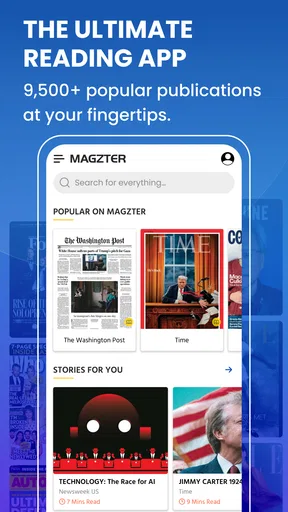
First off, let’s talk about the sheer volume of content available on Magzter. It’s like walking into the biggest newsstand you’ve ever seen, but without the hassle of flipping through physical pages. With over 5,000 magazines and newspapers, there’s something for everyone. Whether you're into fashion, tech, sports, or lifestyle, this app has you covered.
I found the app’s interface to be quite user-friendly. You can easily navigate through categories or search for specific titles. Plus, the layout doesn’t overwhelm you with too many options at once. It’s just you and your choices, making for a pleasant browsing experience.
Personalized Reading Experience
One of the coolest features I discovered is the personalization aspect. The app learns from your reading habits and recommends content based on what you seem to enjoy. It’s like having a personal librarian who knows exactly what you want to read next. Pretty neat, right?
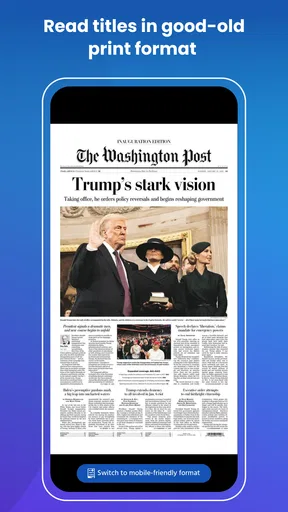
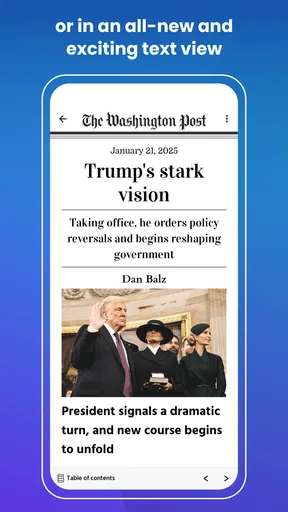
Once you select a magazine or newspaper, the reading experience is smooth and intuitive. The text is crisp, and the images are high-quality, making it easy to forget you’re not holding a physical copy. You can even download issues for offline reading — perfect for those long commutes or travel days.
Subscription Plans and Value
Now, let’s chat about the subscription aspect. Magzter offers a few different plans, including a Gold membership that gives you unlimited access to thousands of magazines. I must admit, the idea of having so many magazines at your disposal for a monthly fee is pretty tempting. It’s especially valuable if you’re a voracious reader who devours content regularly.
For those who prefer a free peek, Magzter also provides a selection of free articles and magazines. It’s a great way to test the waters before committing to a paid plan. And trust me, the temptation to upgrade is real once you start exploring.
User Experience and Interface
In terms of performance, the app is generally smooth, although I did notice some occasional lag when navigating through larger files. It’s not a dealbreaker, but it’s something to be aware of if you’re planning to use it on older devices.
The design is sleek and modern, with a focus on readability. The dark mode feature is a nice touch for late-night reading sessions, and the adjustable text size means you don’t have to squint at small print. Overall, it’s designed with the reader in mind.
A practical way to judge its value
I’d judge the subscription by my reading habits, not by the headline appeal of having a huge selection available. If I regularly finish issues from several publications, broad access may feel worthwhile. If I mainly want one newspaper or only read occasionally, paying for a larger collection could be more than I need. The app is free to install, while in-app purchases range from under a dollar to several hundred dollars per item, so I’d read each purchase screen carefully and make sure I understand what I’m choosing before confirming.
A low-pressure way to decide is to spend a little time with the free material first. I’d note which titles I actually open and whether I return to them, rather than counting how many interesting covers I see while browsing. That gives a more honest picture of value than the size of the catalogue alone. It also helps distinguish a passing curiosity from a publication I’ll make time for each week.
Who will enjoy the variety most
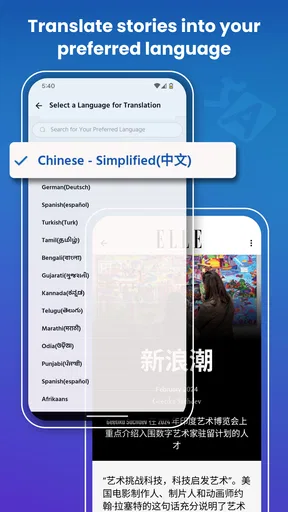
I think Magzter is best suited to curious readers who like moving between subjects, and to people who want a single place to discover publications they might not otherwise seek out. Its range across more than forty categories and over sixty languages makes variety a real part of its identity. That can be especially helpful for multilingual readers or anyone who wants to explore coverage and interests beyond their usual daily news sources.
It is less compelling for a reader who already knows exactly which one or two publications they want and prefers a direct, familiar route to them. In that case, a publisher’s own app or a print subscription may be a better fit. I’d also steer away from relying on Magzter as my only reading plan for a long offline stretch: connectivity and access should be checked in advance, and a backup book or downloaded material from a service I already know works offline may be safer.
A realistic routine might look like this: I browse the catalogue over home Wi-Fi on Sunday, find a title that matches something I’m interested in, and then set aside a few minutes with it during the week. If I’m taking a train, I check my planned reading before leaving instead of counting on a strong signal en route. This turns the app from an idle browsing habit into a useful part of the week, while keeping both data use and expectations in check.
Final Thoughts
So, is Magzter: Magazines, Newspapers worth downloading? If you’re someone who loves keeping up with the latest issues without the clutter of physical copies, this app is a fantastic option. The extensive library and personalized recommendations alone make it a standout choice.
However, the real value lies in the subscription plans, so if you’re willing to invest in a Gold membership, you’ll likely get the most out of it. Whether you’re a casual reader or a magazine junkie, Magzter offers a digital reading experience that’s both convenient and enriching.
As a news and magazines app from Magzter Inc., it has been around since June 23, 2011, and version 8.69.2 is listed for devices running Android 6.0 or later. It is free to download, carries a Teen content rating, and has an average rating of 3.8 from around 41,000 ratings, with more than 1,000,000 installs. Those figures suggest an established audience, though they can’t tell me whether its mix of publications matches my own interests. I’d still make the decision by trying the browsing experience and checking which titles I would genuinely read.
My connectivity verdict is straightforward: Magzter is most convenient when I can browse with a reliable connection and plan ahead for reading on the move. It can be a good companion for varied reading, but I wouldn’t depend on it without checking access before a journey or treating it as a replacement for a focused newspaper app. If that balance suits your routine, give it a whirl and see whether it earns a regular place on your phone. Happy reading!
Pros
- Wide variety of magazines and newspapers.
- User-friendly interface for easy navigation.
- Offline reading available for convenience.
- Supports multiple languages for global users.
- Regular updates with new content.
Cons
- Requires subscription for full access.
- Occasional loading delays with high-res content.
- Some magazines have limited back issues.
- Ads can be intrusive in the free version.
- Offline downloads take up significant storage.
FAQs for Magzter: Magazines, Newspapers
What is Magzter, and how does it work?
Magzter is a digital magazine and newspaper platform that offers access to thousands of publications across various genres. Users can subscribe to magazines and newspapers, read them offline, and even share articles. The app is available on both Android and iOS, ensuring seamless reading experiences across devices.
Is Magzter free to use?
Magzter offers both free and paid subscriptions. While some magazines and newspapers are available for free, others require a subscription. The Gold plan provides unlimited access to a wide range of publications. Users can choose the subscription model that best fits their reading preferences and budget.
Can I read Magzter content offline?
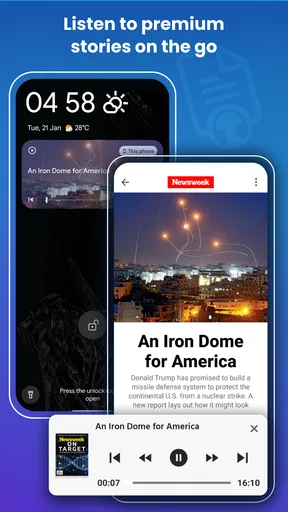
Yes, Magzter allows users to download magazines and newspapers for offline reading. This feature is particularly useful for those who want to access content without a constant internet connection. Simply download the issues to your device, and you can read them anytime, anywhere.
What kind of publications are available on Magzter?
Magzter boasts a vast library of over 5,000 magazines and newspapers. The app covers a diverse array of genres including lifestyle, business, technology, entertainment, and more. Whether you're interested in niche hobbies or mainstream news, Magzter has something to offer for every reader.
How does Magzter ensure a user-friendly experience?
Magzter is designed with user convenience in mind. The app features a streamlined interface, personalized recommendations, and easy navigation. Users can bookmark their favorite articles, customize their reading lists, and receive notifications for new issues, ensuring a tailored reading experience.


